
Tunemark Radio2.8 - App Store
You'll be able to see results in few seconds.
Publisher Description
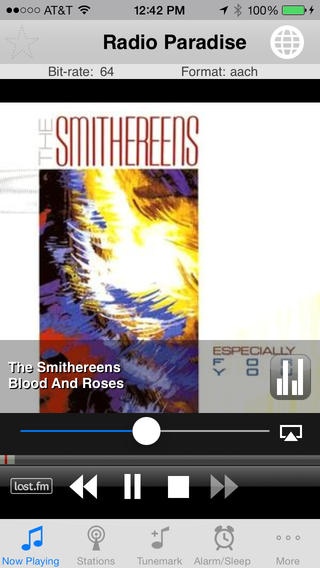
Tunemark Radio is an advanced Internet radio tuner. Listen to TENS OF THOUSANDS of radio stations from around the world. View album artwork and artist info for the current playing song, share the song details with friends via Twitter, Facebook, or last.fm, find the song on iTunes, and much more!
NOTE: If you are having trouble with buffering under iOS 6, please go to the More->Settings on the tab bar and choose 20 seconds rather than the default of 10. This should help.
This radio player will never have any banner ads. Enjoy!
Features include:
* Background play support
* Pause, Rewind, and Fast Forward back to the live stream
* Tunemark songs - search on iTunes, email song info, or save to a list for later reference
* Alarm clock / sleep timer - fall asleep and wake up to your favorite station
* Album artwork and artist information displayed when available.
* AirPlay support - stream the music wirelessly to other AirPlay compatible devices!
* Support for mp3, AAC, AAC+ v1 and AAC v2 audio
* Tell your friends about your favorite songs via Twitter, Facebook, and last.fm scrobbling
* Add custom URLs - pls, m3u, and mp3 and AAC direct link
* Browse the complete SHOUTcast directory, either by most popular genres or all genres
* Browse top 100 stations
* Search SHOUTcast via keywords
* SHOUTcast stations can be made favorites for faster reference
* Custom background wallpaper - choose your own picture from your camera roll or choose from 4 supplied background images.
* Music visualizer! Tap on the animated bar graph for a full screen music visualizer that changes in response to the music.
If you have any suggestions for improvements, feel free to leave feedback in your app reviews or contact Stormy Productions directly via the feedback button in the app.
Requires iOS 7.0 or later. Compatible with iPhone, iPad, and iPod touch.
About Tunemark Radio
The company that develops Tunemark Radio is Stormy Productions. The latest version released by its developer is 2.8.
To install Tunemark Radio on your iOS device, just click the green Continue To App button above to start the installation process. The app is listed on our website since 2009-09-05 and was downloaded 0 times. We have already checked if the download link is safe, however for your own protection we recommend that you scan the downloaded app with your antivirus. Your antivirus may detect the Tunemark Radio as malware if the download link is broken.
How to install Tunemark Radio on your iOS device:
- Click on the Continue To App button on our website. This will redirect you to the App Store.
- Once the Tunemark Radio is shown in the iTunes listing of your iOS device, you can start its download and installation. Tap on the GET button to the right of the app to start downloading it.
- If you are not logged-in the iOS appstore app, you'll be prompted for your your Apple ID and/or password.
- After Tunemark Radio is downloaded, you'll see an INSTALL button to the right. Tap on it to start the actual installation of the iOS app.
- Once installation is finished you can tap on the OPEN button to start it. Its icon will also be added to your device home screen.
Program Details
System requirements
Download information
Pricing
Version History
version 2.8
posted on 2009-09-05
Disclaimer
Official App Store Link
We do not host Tunemark Radio on our servers. We did not scan it for viruses, adware, spyware or other type of malware. This app is hosted by Apple and passed their terms and conditions to be listed there. We recommend caution when installing it.
The App Store link for Tunemark Radio is provided to you by apps112.com without any warranties, representations or guarantees of any kind, so access it at your own risk.
If you have questions regarding this particular app contact the publisher directly. For questions about the functionalities of apps112.com contact us.
